Virgil
Building a mobile app that brings daily experiences into a clearer health history.
View GitHub repository ↗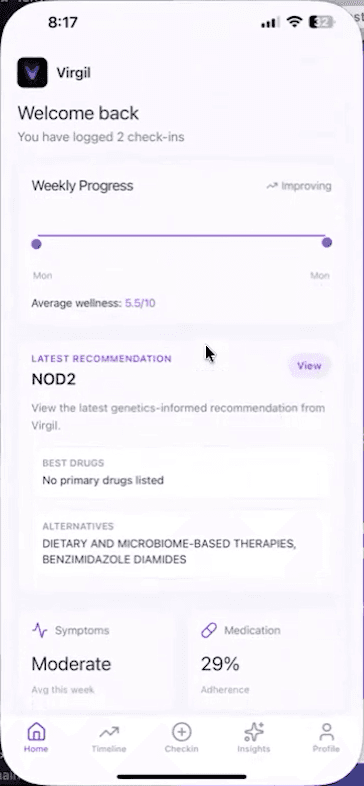 Home dashboard
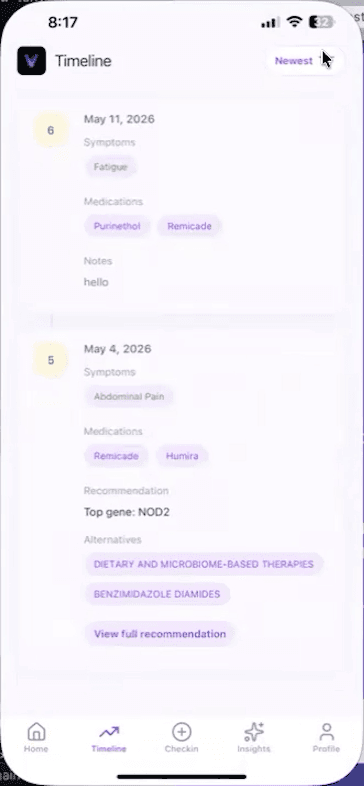 Timeline
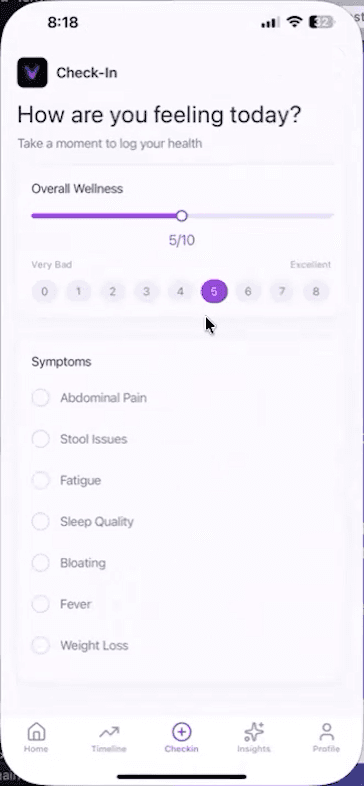 Wellness & symptoms
context
Bring daily symptoms, medication records, and patient history together so there is more context to review over time.
Virgil is a Cal Poly bioinformatics capstone prototype focused on inflammatory bowel disease, or IBD. The earlier system accepted genetics files and health information. My team and I expanded that concept into a mobile experience for recording daily check-ins, reviewing history, managing genetics documents, and viewing saved results.
I worked directly with physicians to bring their vision for Virgil to life. That collaboration gave me a chance to learn from doctors while building something for people living with IBD.
problem
The team’s clinician discussions identified a gap between appointments: symptoms, medication changes, treatment responses, and how someone felt over several weeks can be difficult to reconstruct later. Virgil’s goal was to collect dated, structured entries that a patient could return to before a visit.
The application also needed to connect that history with a separate recommendation workflow. The challenge was to make entering information, reviewing past check-ins, and viewing saved results feel like parts of the same mobile experience.
my role
As the lead software developer, my job was to turn the clinical vision into a working mobile experience and connect it to the existing genetics system. That responsibility covered:
- Mobile development: Built the navigation, onboarding, home dashboard, daily check-in, and timeline workflows.
- Accounts and patient records: Integrated Supabase authentication, session persistence, patient profiles, and saved health data.
- Backend integration: Extended the inherited Flask backend with a patient-context adapter and connected storage-backed recommendation runs to the mobile app.
- AI Insights: Implemented an optional service that uses saved patient context to explain recorded information and prepare questions for a doctor.
- Technical handoff: Documented setup, architecture, app flows, and remaining limitations so future student developers could continue the project.
My team and I worked across engineering and clinical research, building on the genetics engine and clinical mappings inherited from earlier contributors.
user flow
I built the navigation around a simple question: what does this person need to do next? The opening screen restores the session, sends signed-out users through onboarding, and checks whether a signed-in user has a patient profile. A valid login alone is not enough to start saving health records.
A check-in becomes a dated record
I built the check-in flow around wellness and stress scales, symptom selections, severity, medication use, and optional notes. The clinician discussions called for structured answers that the system could use directly, while notes left room for details the selections did not capture.
Saving creates a main check-in row, then related symptom and medication rows. I connected those records to the timeline so a patient could review earlier entries, and to the home screen for basic summaries. The same entry has a life beyond the form.
The current saves are separate operations, so a later failure can leave an incomplete entry. The form also requires a symptom selection; supporting a symptom-free day is an important product decision for the next iteration.
Wellness & symptoms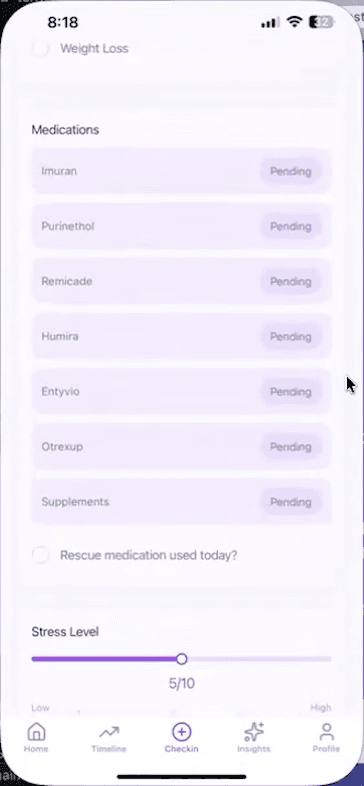 Medication tracking
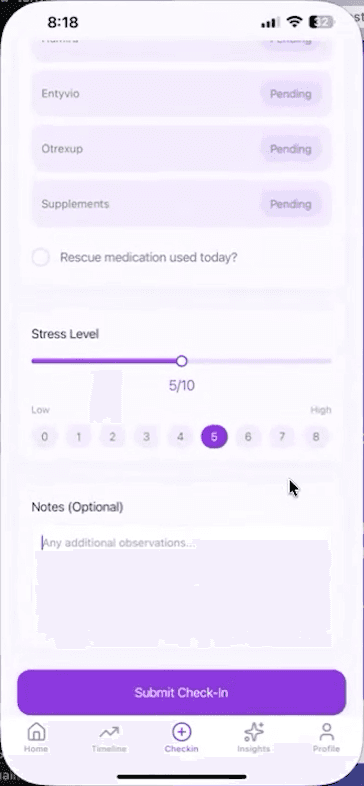 Stress & notes
A genetics run has its own prerequisites
I connected document upload and active-file selection to the recommendation workflow. The app checks for a patient profile, a selected or latest check-in, and an active genetics file marked ready. Missing inputs appear as blockers before a run is requested.
With a backend configured, the mobile request identifies the profile, document, storage path, and optionally a selected check-in. The Flask backend checks the record relationships, retrieves the file, adapts the patient context, applies the inherited genetics and medication rules, and saves a result for the app to display.
Saving a check-in does not automatically generate a recommendation. I changed the mobile flow to save the entry and show pending output while keeping generation in the separate backend workflow.
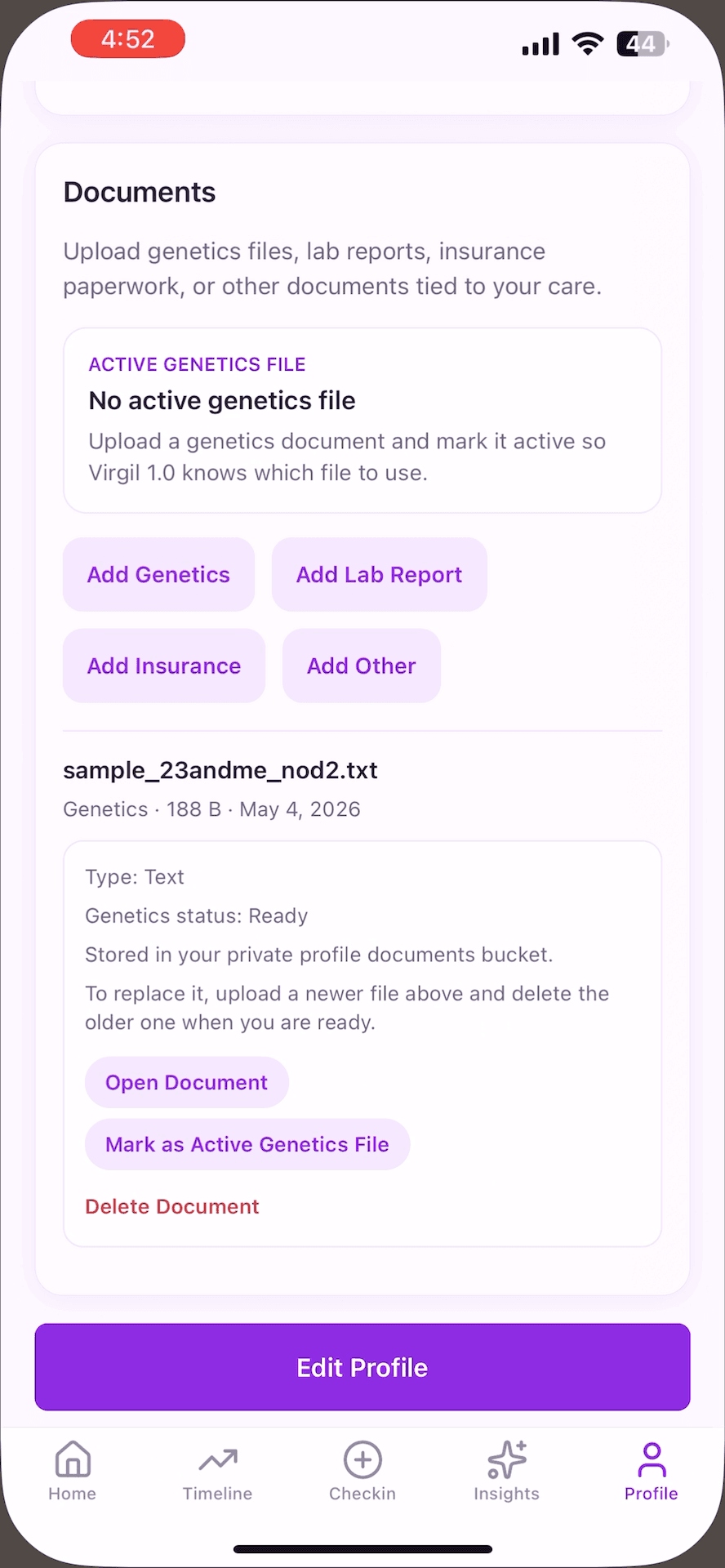 Document management
architecture
The engineering challenge was bringing a newer patient app together with an inherited genetics system. I integrated a shared Supabase data layer and extended the backend connection so the two generations could work with the same patient context.
The older engine expected patient information in its own format. I extended the backend with an adapter that translated the newer shared records into that format, rather than rebuilding the original genetics engine.
That let the mobile app focus on collecting and presenting information while reusing the project’s existing Python processing. The integration still needed agreement on identifiers, field meanings, and result structure. A shared database does not make those differences disappear.
The legacy web upload remains a separate path: it sends an upload to Flask and displays returned results. That ordinary upload does not, by itself, establish that a result was saved into a mobile patient’s history.
The existing web workflow
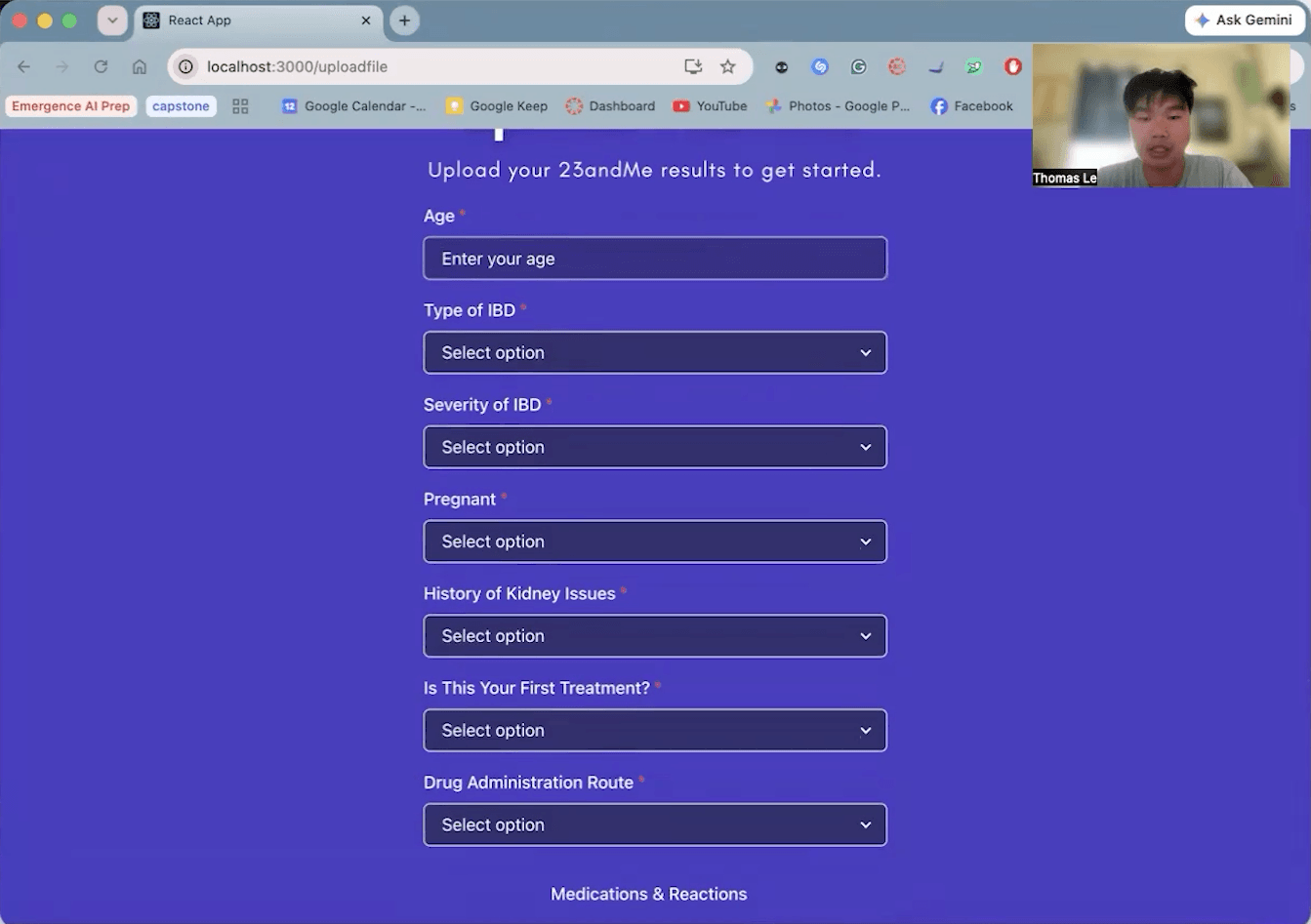 Web upload form
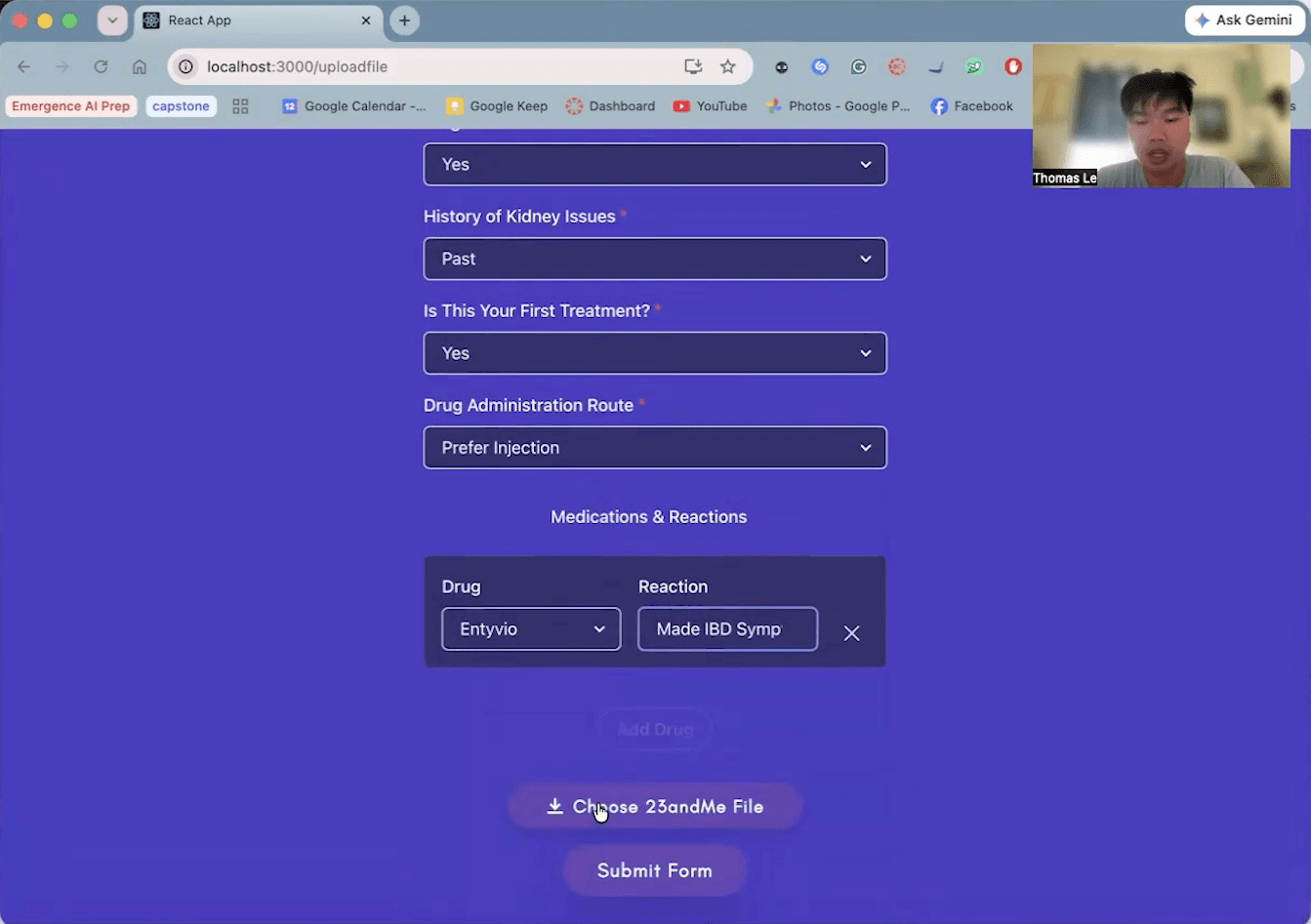 Medication history
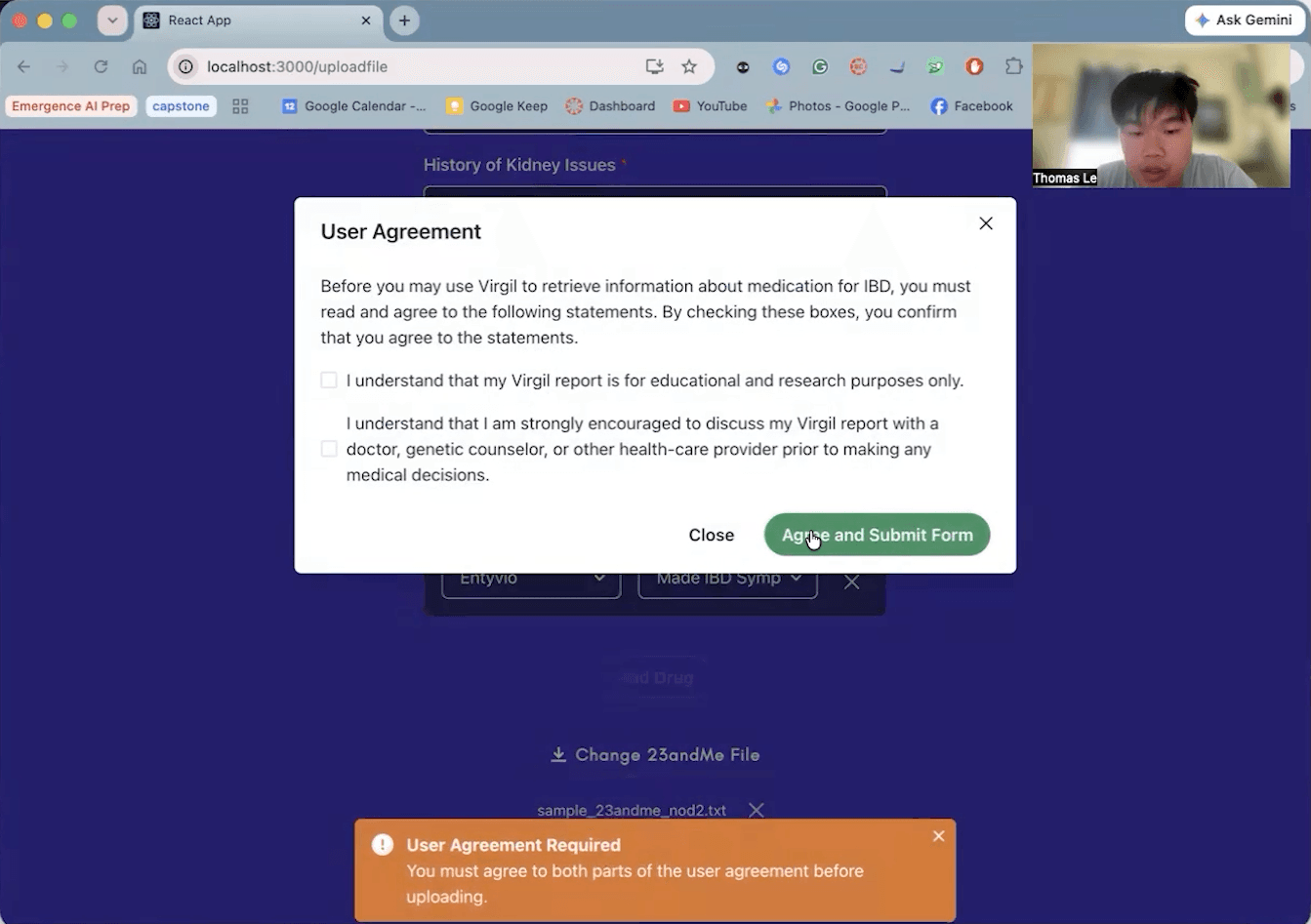 Consent dialog
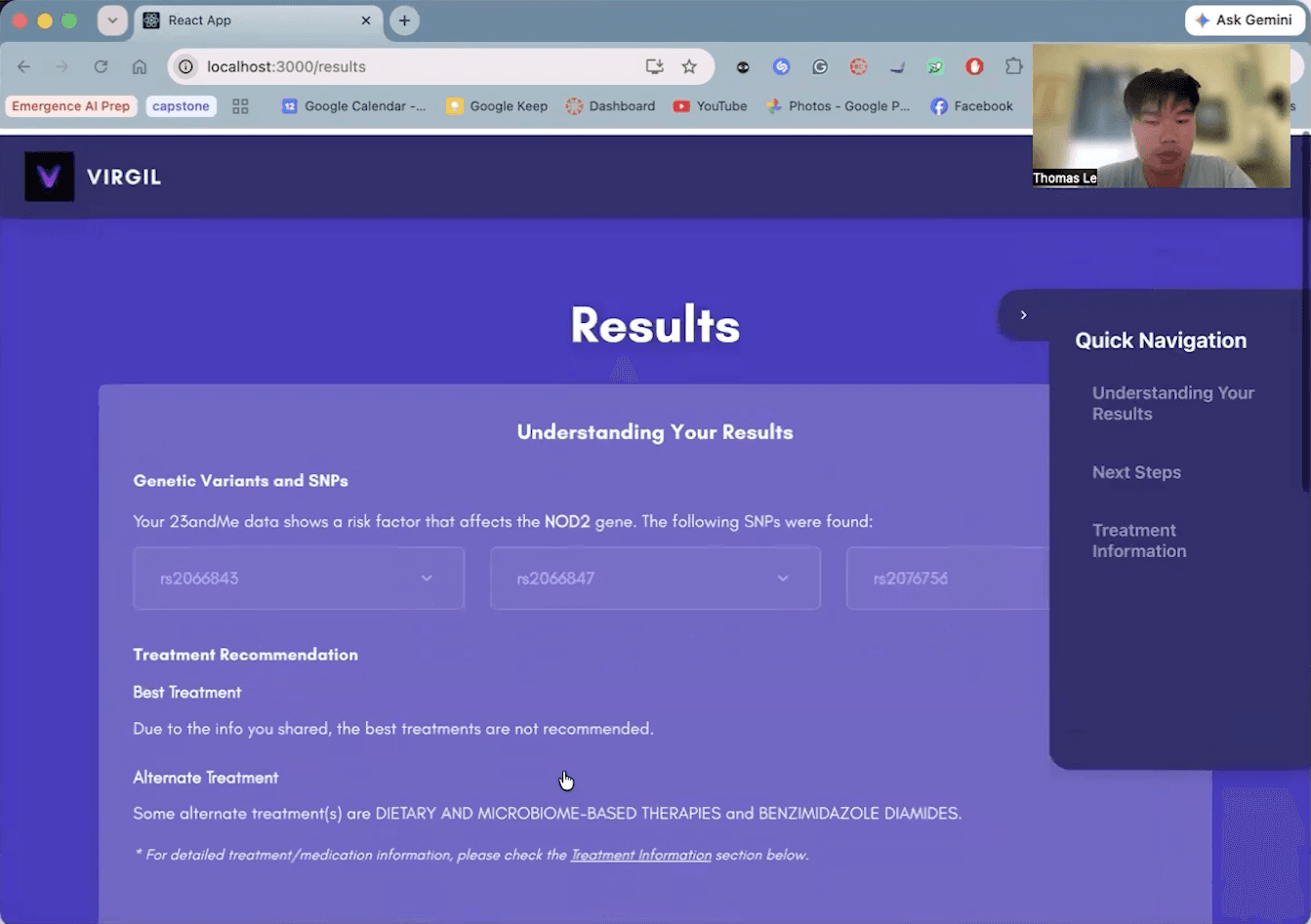 Web results
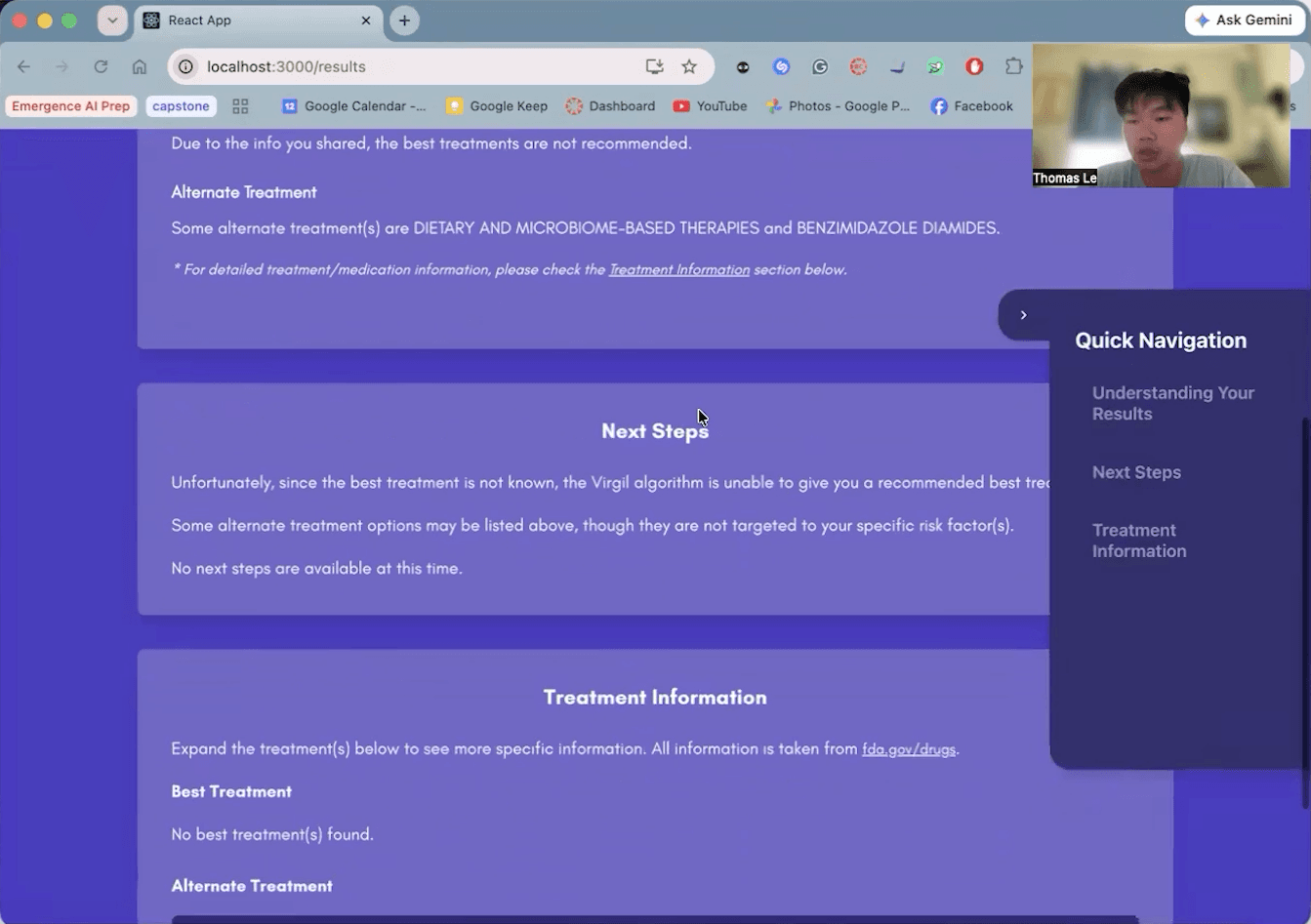 Treatment information
engineering decisions
Why this stack fit Virgil
Virgil needed a phone experience that someone could return to for short, regular check-ins. React Native gave me a shared mobile interface for the iOS and Android goal, and Expo provided the development environment and device-file tools for document uploads.
I used Expo Router to organize onboarding, the main tabs, profile setup, and recommendation screens as routes. That made the navigation structure visible in the code: a future student could find the screen they needed to change without first tracing a custom navigation system.
TypeScript was useful at the boundaries between screens and services. A check-in, a genetics-run request, and an Insights response each need a clear shape. Types make missing or mismatched fields easier to catch during development, although they cannot prove that a backend response is correct at runtime.
What mattered to me was connecting the experience all the way through: the fields a patient enters, the records I save, and the information I bring back onto the screen.
Why PostgreSQL through Supabase
A patient profile has many check-ins. Each check-in has symptom and medication records, and saved recommendations need to connect back to patient context. A relational model fits that structure: the records can stay separate while being connected through identifiers.
Supabase combined PostgreSQL with account handling and file storage. I integrated those pieces so the app could restore a session, resolve the patient profile, save entries, and manage genetics documents through the same shared platform.
A document database such as Firestore or MongoDB could also support this product. For Virgil, the useful tradeoff was having explicit relationships between records that multiple screens and the inherited backend needed to understand. A document model would still need a deliberate strategy for references, embedded data, and keeping repeated information consistent.
| Information | Place in the workflow |
|---|---|
| Account → patient profile | The Auth user is resolved to a separate profile record. |
| Check-ins → symptoms and medications | Dated entries connect to their individual selections. |
| Document metadata → file Storage | The database describes the document; Storage holds the file. |
| Saved recommendations | The mobile app reads output made available by the backend. |
Why keeping two repositories made sense
The mobile repository contains the React Native app. The other repository contains the older React web interface and Python/Flask backend. Keeping that split preserved the existing genetics work while I built the patient-facing mobile experience.
The useful boundary was responsibility: the mobile app collects and displays information; the backend processes the genetics workflow. A mobile screen change could stay with the mobile code, and a backend change could stay with the inherited processing code. The split also gives future developers a clearer starting point for either part.
Two repositories come with coordination work. Changes to patient fields or API responses need to be reflected on both sides, and the complete workflow needs integration testing across them. I prepared setup, architecture, flow, and limitation documents so that handoff included the connection between the repositories.
A monorepo could organize the same system. The benefit here came from keeping the existing system usable and defining how the new app connected to it.
Moving generation out of the check-in screen
Earlier mobile code scored symptoms locally and saved a recommendation. I removed that execution path and connected the app to the separate genetics-backed workflow. The updated check-in saves patient data; the recommendation screen checks readiness and displays saved backend output.
Earlier prototype
- Enter symptoms
- Run local symptom scoring
- Save a local recommendation
Updated workflow
- Save structured patient records
- Prepare check-in + active genetics file
- Request the separate backend run
- Read the saved result in the app
The updated flow depends on a reachable, configured backend. The original genetics engine was inherited from earlier contributors.
Patient identity needed an explicit connection
The login account ID and patient-profile ID are different. I resolved the Auth user to its profile before saving health records. In this implementation, the check-in’s user reference contains the profile ID.
That detail mattered across the app and backend. A login could succeed while the profile was still missing, and a run needed the selected check-in to match the intended patient. I built the workflow around those relationships and the states where the required information was not available.
Keeping AI behind a separate service
I implemented an optional Node service for Insights. The app loads the patient profile, the ten newest check-ins, the latest saved recommendation, and active-genetics-file status, then sends that context with the question.
The service calls OpenAI and requests a structured response for the interface. Keeping that call on the server keeps the model credential outside the phone app and separates the AI request from the screen rendering. This service lives in the mobile repository; a separate service does not mean a third repository.
I wanted the assistant to work from what the patient had actually recorded. The prototype instructions discourage diagnosis and invented treatment plans, and the interface handles missing service configuration with fallback messaging. This uses saved context; it does not train a model or retrieve uploaded document contents into the prompt.
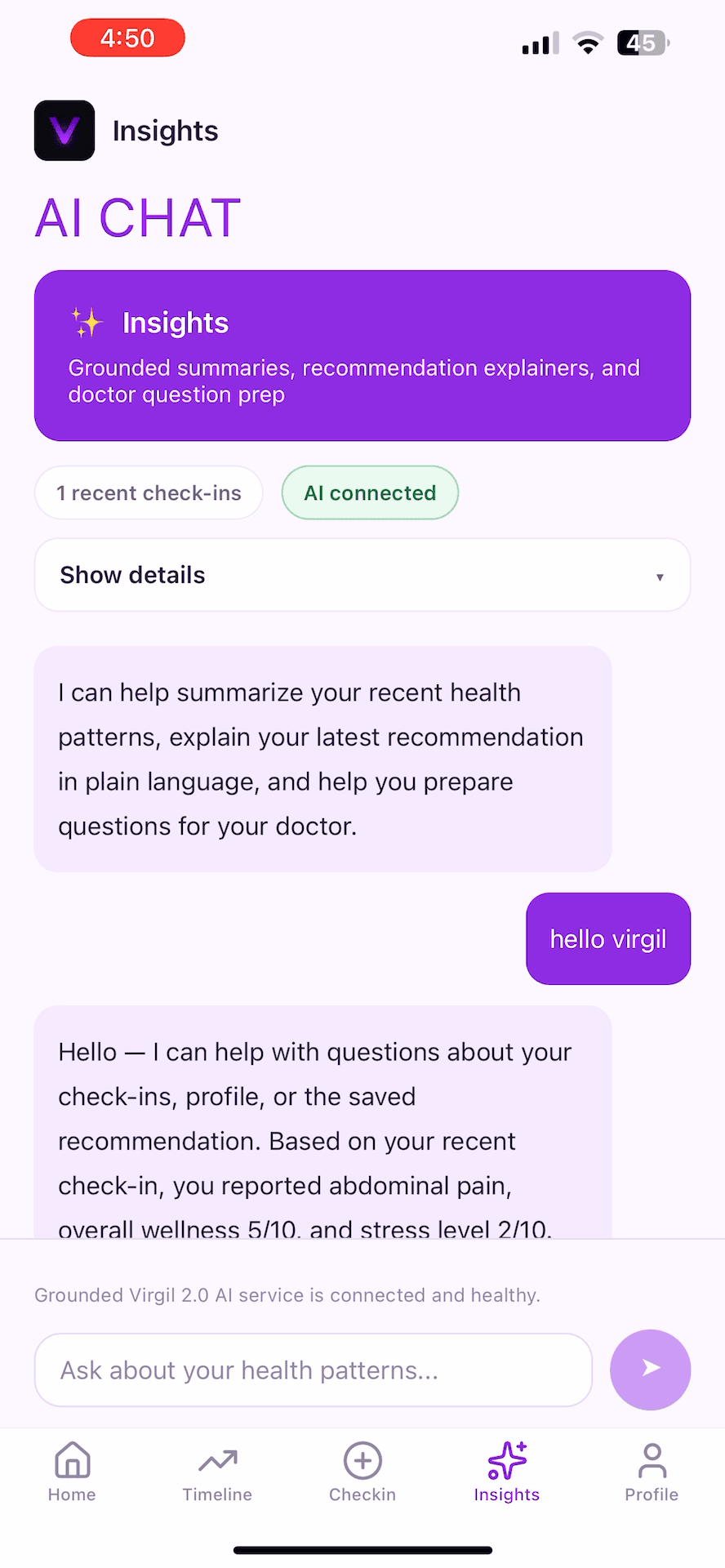 Insights chat
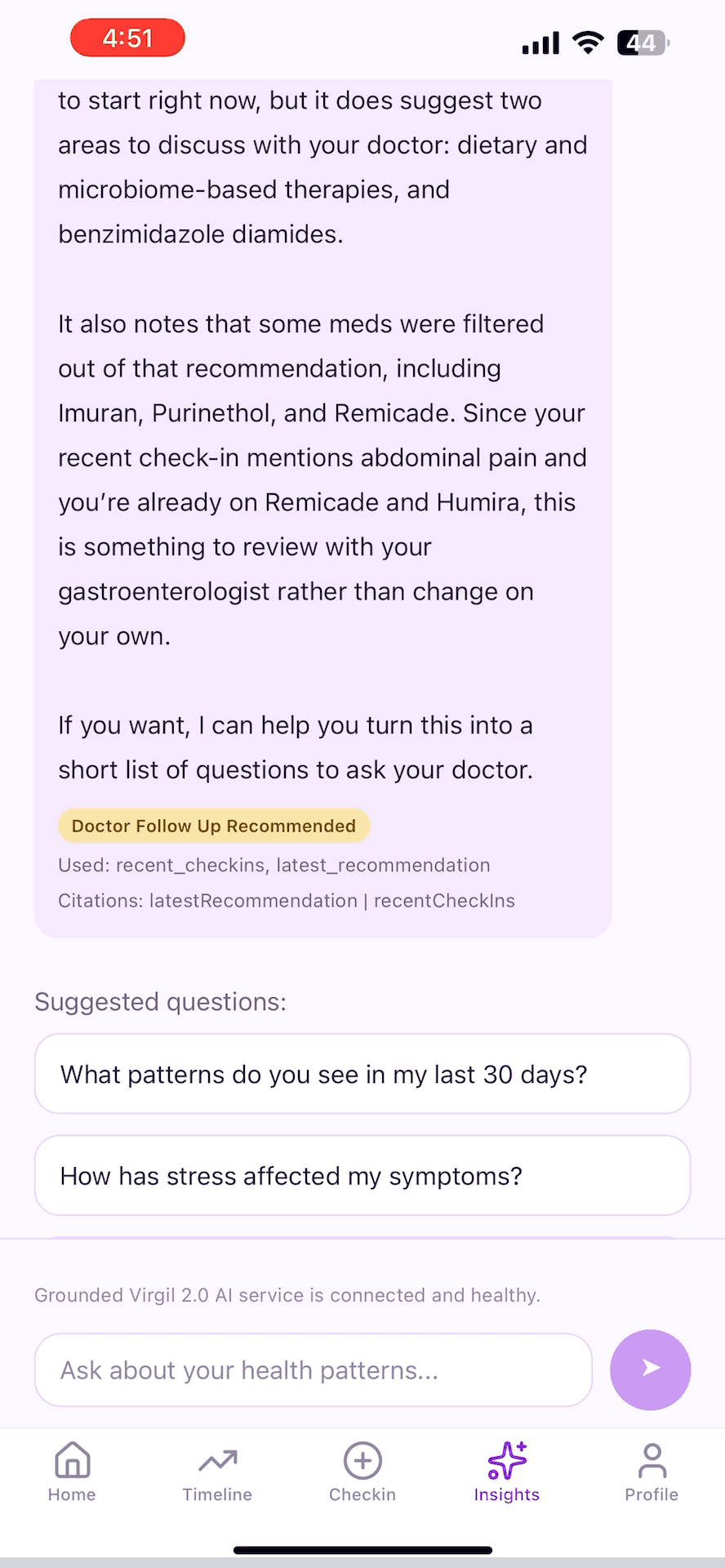 Response & follow-up questions
dataset scope
The inspected backend used a limited curated dataset. These counts describe the rules I was integrating with, rather than a dataset I independently created.
results
I delivered a mobile prototype with accounts, patient profiles, daily check-ins, a history timeline, document management, and saved-result screens. The backend integration connected that newer experience to the inherited genetics system, and the optional Insights service added a way to ask questions using saved patient context.
Those pieces addressed the gap that motivated Virgil: keeping track of what happens between appointments. The prototype gives patients a place to record symptoms and medication use as they happen, with a dated history intended to support conversations with their clinicians. It turns information that could be difficult to remember later into records that can be revisited.
Physicians tested the prototype. That brought the work beyond implementation and into the hands of the people whose clinical perspective shaped the project. They had something concrete to try, and the next team has an implemented experience to continue testing and improving.
My team and I prepared Virgil for continuation, and I wrote the technical handoff covering setup, architecture, workflows, and remaining work. Deployment is the next step for the new team. The result so far is a prototype tested by physicians and a documented foundation for future developers; broader patient use is still ahead. I’m proud that the work can continue toward the people it was built for.
next steps
The next iteration needs to correct medication interpretation: the backend currently ignores the daily taken flag and can treat unchecked medications as already taken. Check-in saving also needs an all-or-nothing operation or recovery path so a failed related save does not leave an incomplete record.
Backend requests need caller authentication and ownership checks. The inspected recommendation trigger does not send a caller token, and the Flask routes do not verify one. Matching a document and check-in to the same profile is useful validation, but it does not establish that the caller owns that profile.
Finally, I want the full upload → active file → check-in → backend run → saved-result journey to be easy for the next developer to demonstrate. The schema, access policies, summary calculations, and service setup need to be documented and verified alongside that flow.
reflection
Virgil is my favorite project because it brought together two things I care about: healthcare and computer science. I worked with physicians to turn their vision into something people could use, and I learned so much from that experience.
That collaboration made me care about how information moved through every part of the app. A field in a form could become a saved record, an input to the older system, and something a patient would review later. Connecting those pieces taught me how much thought goes into making one workflow work across different systems.
Seeing how the work could support people living with IBD made this project mean more to me. I got to connect what I was building with the people it was meant for. That is what made me so passionate about Virgil, and why I want to keep putting time and energy into it.