OncoGraph
Growing a bioinformatics class project into a tool for seeing connections and exploring what to study next.
View GitHub repository ↗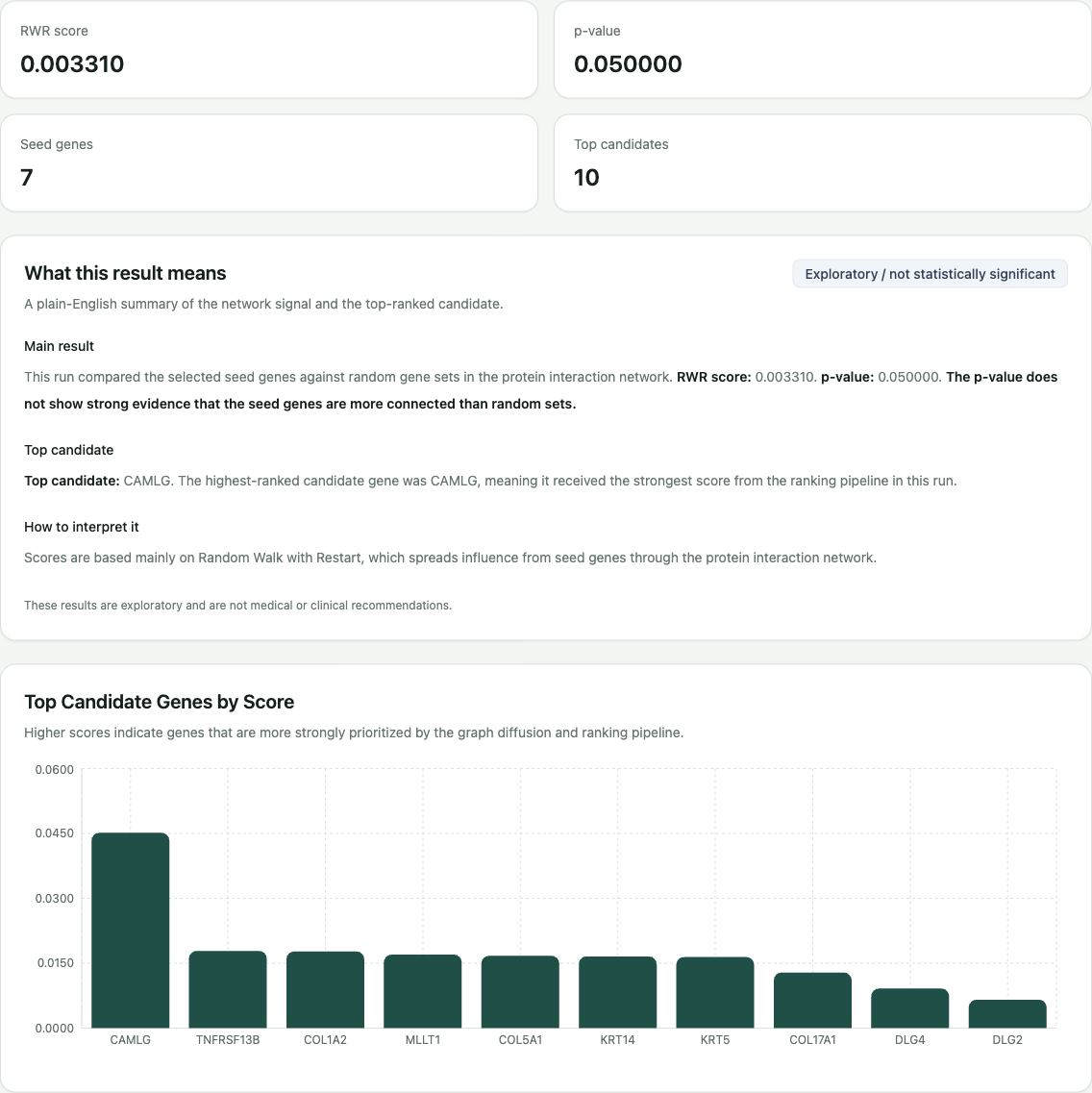
context
Start with known cancer-associated genes, then explore nearby parts of a protein-interaction network for candidates worth investigating.
OncoGraph began as a bioinformatics project I worked on in class. The assignment used a structured Python workflow, and I got really interested in the patterns it was exploring. I wanted to see those patterns, build more visuals, and learn how machine learning could fit into the analysis.
The original question was about network relationships: could the connections around known cancer genes help surface other candidates? I kept growing the project beyond the script, adding a reusable pipeline, an API, and a dashboard for running and inspecting experiments.
- Gene-labeled nodes
- 9,039
- Recorded interactions
- 24,350
- Starting seed genes
- 7
the problem
The early version loaded files, ran simulations, opened plots, and exported candidate names from a Python script. Changing the simulation budget meant changing code, and longer runs could take time.
I wanted to choose settings, follow a run, and understand the results in one place. The challenge was making the computation easier to use while being clear about what a network score could actually tell me.
Edit Python settings → run the script → inspect plots and a text export.
Choose a preset → submit a run → follow its status → inspect ranked results.
the solution
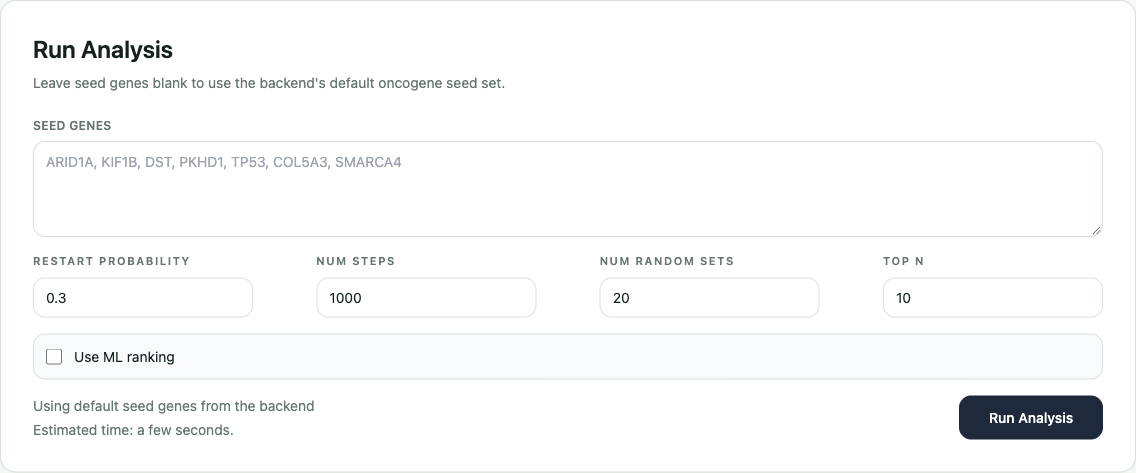
I turned the experiments into reusable Python modules and connected them to a FastAPI service and Next.js dashboard. The dashboard lets someone choose seed genes, change settings, start an analysis, and inspect its progress and results.
My work covered the analysis pipeline, background run tracking, optional database storage, an exploratory ML ranking mode, and the browser interface with presets, charts, and plain-English summaries.
- 01Choose inputs
Known genes and a simulation preset.
- 02Run the analysis
Explore the graph and compare random sets.
- 03Follow status
See running, completed, or failed.
- 04Inspect candidates
Read scores, charts, and explanations.
how the ranking works
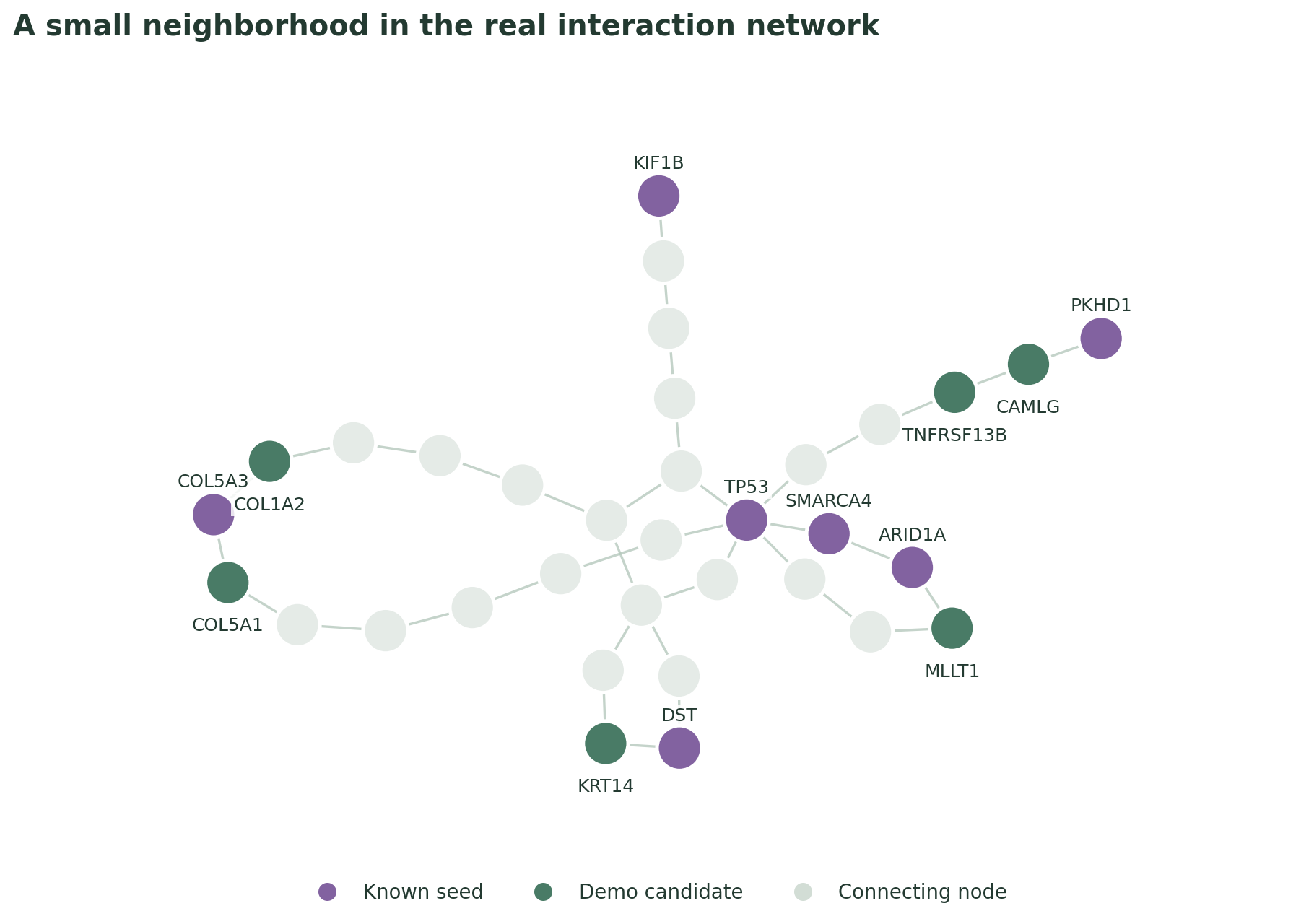
The network is a map of protein interactions labeled with gene names. A seed is one of the known genes used as a starting point. Random Walk with Restart repeatedly moves to neighboring nodes and sometimes jumps back to its starting seed.
After many walks, non-seed nodes visited more often receive higher scores. The pipeline also compares how close the starting genes are with randomly selected gene sets. That comparison answers a different question from the candidate ranking.
Start at a known gene, move to a neighbor, and sometimes return to the starting point. Try a higher restart chance to keep the walk closer to the seed.
0 steps · 0 restarts · currently at Seed
The ML mode gives each gene seven numerical features: its walk score, connection count, network influence, bridge role, closeness to other nodes, distance to a seed, and number of seed neighbors. A small logistic-regression model learns a weighted pattern from those numbers.
The current ranking combines 70% normalized walk score and 30% model output. That keeps the graph walk as the main signal while adding another ranking approach. These weights are a prototype choice, rather than a proven best combination.
The model uses seeds as positive examples and sampled non-seeds as negative examples. A non-seed is not necessarily unrelated to cancer, so this is an exploratory model that still needs independent evaluation.
architecture & tools
The browser collects settings and shows results. The API checks requests and tracks runs. The Python core does the calculations. Results stay in memory by default, or in PostgreSQL when a database is configured.
- Dashboard: Choose settings and send an analysis request.
- FastAPI: Check the inputs and return a run ID.
- Python core: Load the interaction files, run graph walks, and rank candidates in a background task.
- Storage: Keep results in memory by default, or save them in PostgreSQL when configured.
- Dashboard: Ask the API for status and show the finished results.
- Command line: Reuse the same analysis modules without the dashboard.
| Tool | What it does | Why it fits |
|---|---|---|
| Python + NetworkX | Build and explore the gene-interaction map. | Keep the graph algorithms in reusable analysis modules. |
| NumPy + pandas | Organize numerical scores and feature tables. | Give the calculations and ML model consistent inputs. |
| scikit-learn | Train the optional logistic-regression ranker. | Try a small, inspectable model alongside the graph score. |
| FastAPI + Pydantic | Accept settings, validate them, and return run status/results. | Let the browser use the Python analysis through a clear API. |
| Next.js + React + TypeScript | Build the settings, presets, and results screens. | Make an experiment usable without editing Python files. |
| Tailwind + Recharts | Style the dashboard and draw its result charts. | Put the settings and candidate scores into a readable interface. |
| PostgreSQL + SQLAlchemy | Save runs and candidates when a database is configured. | Keep storage optional for lightweight local exploration. |
| Docker Compose | Start the API and database with a shared setup. | Make the development environment easier to reproduce. |
- Python + NetworkX
- Build and explore the gene-interaction map.
- Why: Keep the graph algorithms in reusable analysis modules.
- NumPy + pandas
- Organize numerical scores and feature tables.
- Why: Give the calculations and ML model consistent inputs.
- scikit-learn
- Train the optional logistic-regression ranker.
- Why: Try a small, inspectable model alongside the graph score.
- FastAPI + Pydantic
- Accept settings, validate them, and return run status/results.
- Why: Let the browser use the Python analysis through a clear API.
- Next.js + React + TypeScript
- Build the settings, presets, and results screens.
- Why: Make an experiment usable without editing Python files.
- Tailwind + Recharts
- Style the dashboard and draw its result charts.
- Why: Put the settings and candidate scores into a readable interface.
- PostgreSQL + SQLAlchemy
- Save runs and candidates when a database is configured.
- Why: Keep storage optional for lightweight local exploration.
- Docker Compose
- Start the API and database with a shared setup.
- Why: Make the development environment easier to reproduce.
why I built it this way
- Modules instead of one long script: The graph loader, walk, ranking, and ML code can be reused from both the command line and API. I can change one part without rewriting the whole experiment.
- Background runs: The API returns a run ID while the computation continues. The dashboard asks for updates, so a longer analysis has a visible running state instead of one long request.
- Optional storage: I can explore locally without setting up a database. PostgreSQL adds saved results when configured; the memory-only mode clears when the API restarts.
- Presets and explanations: Smaller settings make a useful demonstration; larger budgets allow more sampling. Showing the parameters and score explanations helps people understand the tradeoff.
the result
The result is an implemented analysis pipeline with a browser workflow: choose settings, submit a run, follow status, and inspect candidates. A small local run completed and returned ten ranked genes, with CAMLG first in that demonstration.
The graph loader reproduced 9,039 nodes, 24,350 interactions, and all seven seeds. The network has 158 separate connected components. Three existing ML unit tests passed, covering score normalization, small-graph features, and exclusion of seeds from candidate results.
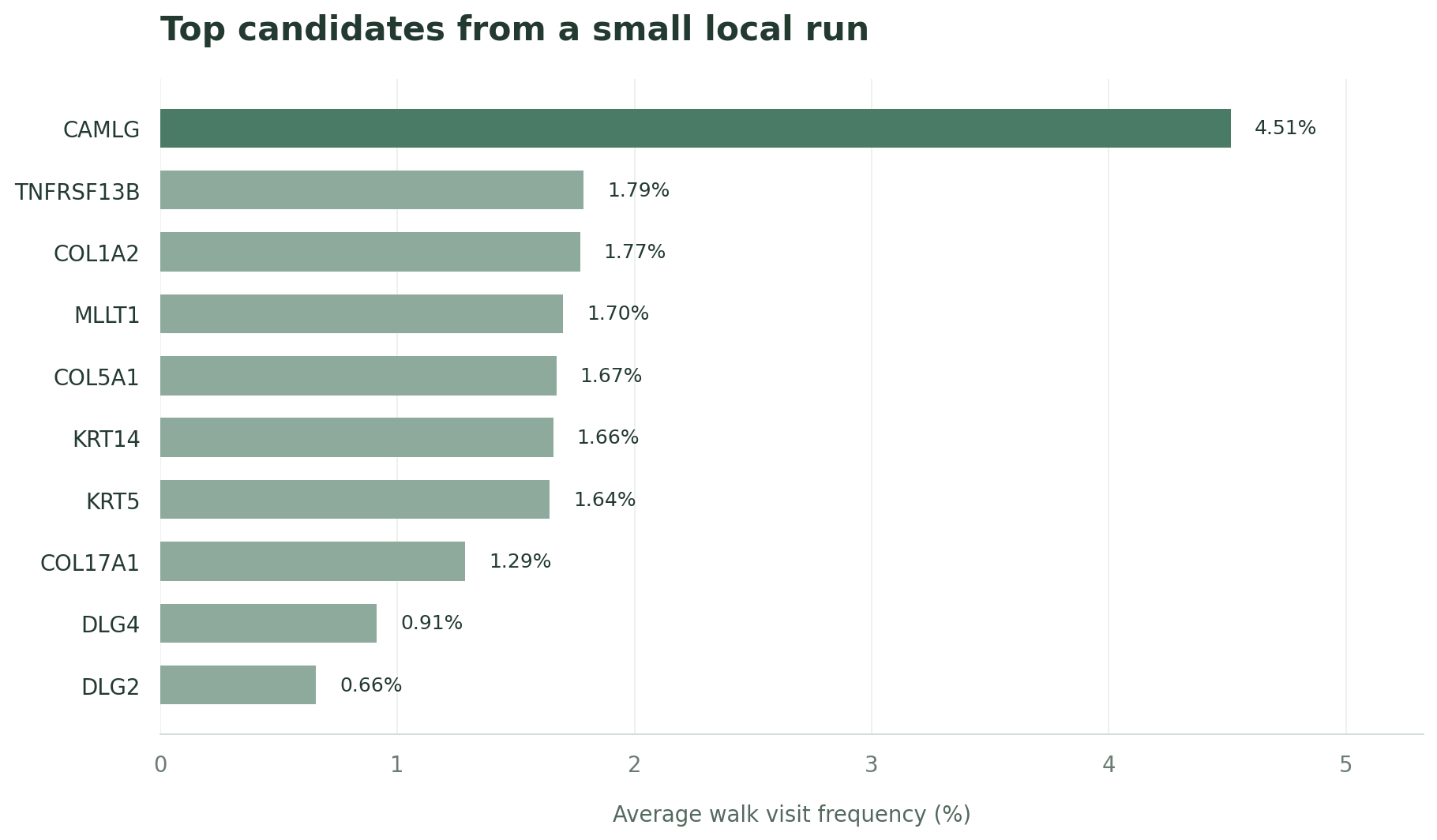
The demo’s seed-set p-value was 0.05. It compares the starting set as a group with random sets; it does not measure how likely each candidate is to cause cancer. This quick run verifies the workflow, while biological prediction quality still needs a separate benchmark.
The figures and app captures come from a local demonstration on October 14, 2026. The full-network ML mode and PostgreSQL persistence were not exercised in this verification.
how this helps
For a student or researcher, OncoGraph provides a shorter list of candidates to investigate and a way to compare experiment settings. The dashboard brings the scores and their explanations together, making the analysis easier to inspect than a list of exported names.
Its role is research exploration and learning. A higher score suggests where to look next in this network; it does not establish a cancer gene or support a clinical decision. That distinction is part of making the tool useful.
what I learned
I started with a class project and kept going because I wanted to see more of what I could do with it. Building the visuals and dashboard gave me a way to explore the patterns, learn about graph features and machine learning, and connect the biology to the software I was building.
I learned that an analysis tool needs more than an algorithm: it needs clear inputs, progress states, readable outputs, and careful explanations. I also learned to separate a ranking score from evidence that a biological claim is true.
Next, I would strengthen seed-input validation, save every experiment setting with its results, test candidate quality against independent labels, and move longer jobs into a durable worker queue so runs can survive an API restart.